
How to Get Your API Key
Obtain your Helpjuice API key to integrate and authenticate API requests

Written by Emil Hajric
Updated on October 21st, 2026, by Amanda Helpjuice
Table of Contents
To interact with Helpjuice's API v3, you'll need an API key. It authenticates your requests and decides what they can access. Helpjuice offers two kinds: the account API key, which has full Super Administrator access, and a personal API key, which acts as you and can only do what your role allows.
In this article, you’ll learn:
- The difference between the account API key and a personal API key
- How to access your API credentials page
- How to create your personal API key
- Important considerations for API key security
- Best practices for managing your API keys
Account API Key vs. Personal API Key
Account API Key
- Acts as: the account, with Super Administrator access.
- Who can get it: Super Administrators and Account Owners.
- Best for: company-wide integrations that need full access.
Personal API Key
- Acts as: you, with the permissions of your role in this account.
- Who can get it: every user except Viewers.
- Best for: scripts and tools you use yourself, where access should match what you can do.
Accessing Your API Credentials
- Navigate to your Helpjuice account and log in with your credentials.
- Click on your profile icon in the bottom-left corner and select Settings.
- In the settings menu, click on API Credentials
- Check the box labeled Require token for API?.
- Your Private Key will be displayed. Click Copy to save it to your clipboard.
- Save Changes
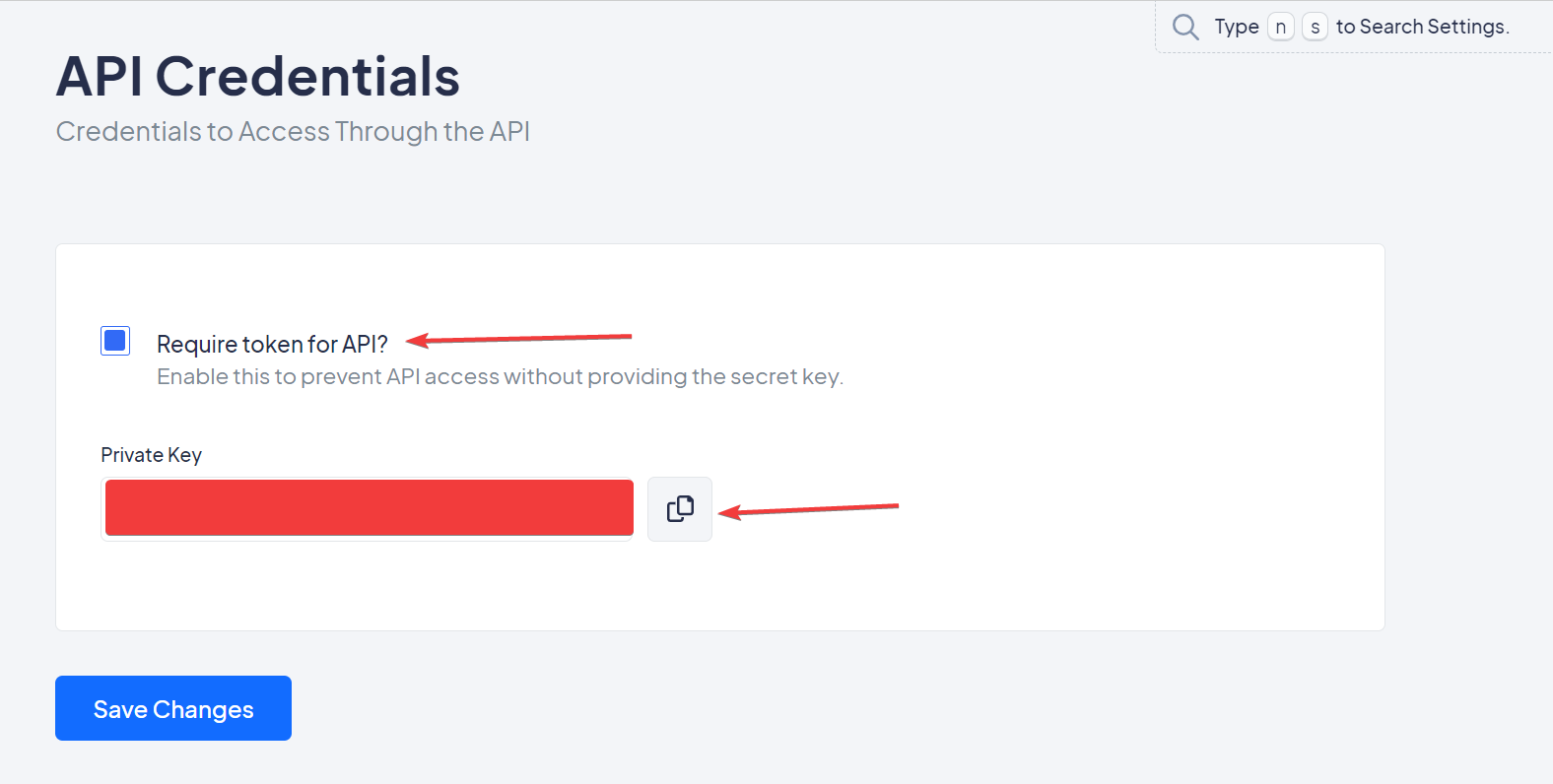
Only Super Administrators and Account Owners have access to the API Credentials settings page.
Creating Your Personal API Key
- Click your profile icon in the bottom-left corner and select Settings.
- Under User Settings, click Personal API Key.
- Click Regenerate and confirm.
- In the Copy your API key window, copy the key and save it somewhere safe, such as a password manager.
- Click Done.

Your personal API key is shown only once. After you close the window, Helpjuice shows only its first characters, with the date it was created and last used.
Use it like the account key: as an Authorization header or the api_key query parameter. Personal keys work only when Require token for API? is turned on in API Credentials. If yours is refused, ask a Super Administrator to check that setting.
- Your key follows your role. If your role can't publish, changes you send to a published article are saved as a draft for review.
- Clicking Regenerate again replaces your key straight away, and the old one stops working.
- If you're deactivated, removed from the account or changed to Viewer, your key stops working automatically.
- If you belong to more than one Helpjuice account, you have a separate personal key in each.
Important Considerations
- Security: Keep your API keys confidential. Do not share them or expose them in client-side code.
- Permissions: The account API key grants Super Administrator privileges to anyone who has it. A personal API key only has the permissions of your role.
- Access: Each account has its own account API key, and each user has their own personal key in every account they belong to.
Best Practices
- Environment Variables: Store your API key in environment variables to keep it secure.
- Access Control: Limit access to your API key to trusted individuals and systems.
- Regular Audits: Periodically review and regenerate your API keys to enhance security.
- Least Access: Use a personal API key when a script only needs your access, not the whole account's.
- Exposed Keys: Regenerate your personal key right away if you think it has been exposed.